
How the Balise connector works
For the curious
What it can reach, and how it connects.
What it can reach
Seven things it can reach. A few small things it can change.
- Your collectionsThe shelves Balise built, their counts, and what each record holds: producer and vintage on a bottle, reference on a watch.
- Memory, and your DaysA night, a trip, the fifth time back at the same counter. One day comes back whole, with a small private overview built from up to four of its photographs.
- Photo search, and the real countNot a sample: exact counts, timelines and tallies across the whole library, several questions at once.
- Your StoriesDrafts and published ones, newest first: the sections in order, the captions, the photographs each one leans on, and the live link when there is one.
- A photo id is a group, not a frameOne Balise photo is often several frames of the same thing. The card says how many, and each frame has its own address.
- The ask you started in BaliseCome over from a Balise ask and the conversation carries on — your questions, the answers, the photographs those answers cited.
- Small changes, when you allow themEach kind needs its own permission when you connect. It can save a private list, keep a published Story you found, set a photo’s reactions and note, fix a wrong detail on one photo, correct an episode or name a person in your Memory, and leave a Story draft for you to finish in the app. It can make a private card or collage from photos you approved. It never deletes, never publishes, and never decides who “me” is.
The tools, by name, for the curious
- query_memory
- search_photos
- query_photos
- get_photos
- list_domains
- get_domain_details
- get_domain_schema
- get_episode
- get_subject
- list_domain_subjects
- compose_share_asset
- list_stories
- get_story
- prepare_story
- list_saved_lists
- save_list
- init_conversation
- list_people
- update_episode
- name_person
- annotate_photo
- correct_photo
- search_saved_discoveries
- get_saved_discovery
- save_discovery
- update_discovery
Your profile page comes up only as the link on something you already published. The connector has nothing else to say about it. And pictures stay unavailable unless you approve an exact request; published cards and stories follow their separate choices.
The specifics
Your assistant finally knows your places, bottles, outfits and trips.
All from photos you already took. Nothing to type in, no new habit: connect once, then ask the way you’d ask a friend who was there. Here’s one ask end to end, the address, every permission by name, and exactly what leaves your phone.
Claude· connected to Balise
What was that wine we had in Mendoza? I want something like it for Saturday.
search_photos · wine, Mendoza
PerSe La Craie 2019, from Gualtallary. You photographed it against the Andes on 4 April 2024. For Saturday, look for another high-altitude Gualtallary red; it’ll be in the same spirit.
Show me the photo.
get_photos · 1 photo · waiting for you in Balise
I’ve asked Balise for it. Approve it on your iPhone within 10 minutes and I can show it to you for the next hour.
get_photos · 1 photo · approved in Balise
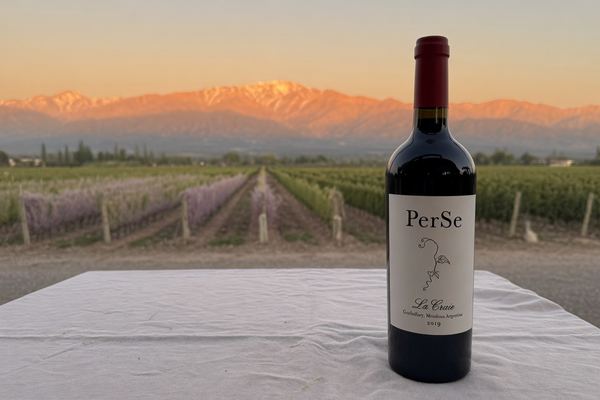
Here it is: the bottle on a white tablecloth, the vines and the Andes behind.
The address
https://mcp.usebalise.com/
- ClaudeIn Balise, open Your Balise → Connected AI and tap Claude. Claude opens with Balise ready to add: choose Add, then sign in to Balise.
- ChatGPTTap ChatGPT. Balise copies the address and opens ChatGPT’s plugins page: tap +, paste it under Connection, then sign in to Balise. For now, ChatGPT needs developer mode on.
- Any other MCP clientPaste the address. Sign-in runs through your Balise account with OAuth 2.1 and PKCE: no API key or password to hand over. Disconnect anytime from the assistant or from Balise.
What Claude receives when it searches
Example · the search_photos result for the Mendoza question, shortened
{
  "mode": "photos",
  "total": 1, "returned": 1,
  "query": "wine Mendoza",
  "photos": [{
    "id": "example-photo-id",
    "title": "PerSe La Craie 2019 against the Andes",
    "description": "A bottle of PerSe La Craie 2019 on a white tablecloth, vines and the Andes behind.",
    "captured_on": "2024-04-04",
    "place": "Gualtallary, Mendoza, Argentina",
    "scene": "Outdoor table in a vineyard",
    "domains": ["wine"],
    "facts": ["wine › bottle: producer=PerSe, cuvee=La Craie, vintage=2019"]
  }],
  "capture_groups": [ … ], "facets": { … }
}
There’s no image in it, only text. Claude gets a photo only if it asks for one separately and you approve that exact photo in Balise.
Permissions, by name
| Permission | What it allows |
|---|---|
balise:memory:read | Search, count and look up your collections, Memory, Stories and saved finds. Facts only. Required to connect. |
balise:photos:read | Ask for exact photos. Nothing is sent until you approve that selection in Balise. Also needed for a private card or collage. |
balise:lists:write | Save or replace a private List, after you confirm it in the chat. |
balise:discoveries:write | Keep a published Story or highlight you found, with your reaction and note. |
balise:memory:write | Your own corrections: an episode’s title, place or photos; a person’s name and relationship; a photo’s reactions and note; a wrong vintage or producer. |
balise:stories:write | Leave a Story draft (photo picks and sections) for you to finish in the app. It stores no images and publishes nothing. |
None of them deletes anything, publishes anything, or decides who “me” is.
What leaves your phone
- Processing copiesEncrypted on your iPhone before upload, deleted after processing. Your originals stay in Apple Photos.
- Facts, for your assistantNames, dates, places, what’s visible, your reactions and notes, as searchable text.
- A photo, only on your yesBalise shows you the exact selection. You have 10 minutes to approve; access through Balise ends one hour after approval, and looking again doesn’t extend it.
- What it already hasA photo delivered to your assistant stays there, under its own terms. The hour ending stops new access through Balise; it doesn’t reach into the chat.
- Published StoriesStay up until you take them down.
Our team can’t open your private photos.
Who runs the AI
- The platformBalise runs on Vertesia, an AI platform with SOC 2 certification. What Balise learns is filed there under an opaque account ID — never your email or your sign-in.
- The modelsThe main providers of cloud and AI are OpenAI and Google. We choose the models, and we change them when better ones come along.
- What they seeTemporary copies while Balise learns a photo, and the photos of a Story or drawing you ask for. Memory and Search get the facts as text, never the pictures.
- Your connected AI, with
balise:memory:readSearchable facts across your collections, Memory and Stories: names, dates, places, what’s visible, your reactions and notes. A photo goes out only when you approve that exact selection.
None of them may train models on your photos.
How it connects
Three steps, one of them optional.
- Import the photos you choose.Search fills in as each photo becomes ready, with its date, place, visible facts and any note you add. If you let iOS share only selected photos, that works too: Balise only sees the photos you chose.
- Open Your Balise → Connected AI.Choose your AI app, sign in to Balise and authorize the private connector.
- Approve an exact photo request when needed.Facts work without image access. If your assistant needs photos, Balise shows you the exact selection before anything is sent.
Balise uses the connector support available in Claude and ChatGPT. Your AI service’s own terms and account controls apply to anything you ask it to receive.
The boundary
You choose how far the connection goes.
Mostly it looks. When it writes, it stays private.
Your AI can search, count and look things up — collections, Memory, your Stories, the facts off each photo. It can also make the small fixes you’d make in the app: a list, a reaction or note, a wrong vintage, an episode title, a person’s name. Each kind of change needs its own permission. Nothing it does deletes anything or publishes anything.
Facts by default. Photos by permission.
Names, dates, places, visible details and your marks are available as text. If your AI asks for older pictures that are not already available, Balise shows you the exact selection in the app and sends nothing until you approve it.
Your originals stay in Apple Photos.
Processing copies are encrypted on your iPhone before upload. A dedicated private service decrypts them for processing, and ordinary copies are deleted afterward.
Every photo request expires.
Balise shows you the exact selection. Approval gives only that requesting connection access through Balise for one hour, and viewing does not extend the deadline. The hour ending does not erase a photo already delivered to your assistant.
Where the facts live
What Balise learned — titles, places, dates, a wine’s vintage — is stored as text with Vertesia, the AI platform Balise is built on, under a key that opens your account and no other. That text isn’t covered by the per-photo encryption: it is kept in private storage, behind access checks for your account. Your assistant receives exactly that text: the search_photos result above. For a copy, email apps@usebalise.com (the export is kept 30 days). To erase it all, in the app: Your Balise → Photos & imports → Delete all Balise data.
How your photos are protected · The precise retention rules live in the privacy policy. Your connected AI service follows its own terms and settings after it receives a photo.